VT100 Terminal App
Circle VT100 module documentation
Loading...
Searching...
No Matches
CTWlanLog Class Reference

Network logging endpoint streaming log traffic to remote clients. More...

#include <TWlanLog.h>

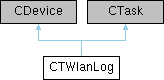
Inheritance diagram for CTWlanLog:
Public Member Functions

 CTWlanLog ()
 Construct the WLAN logging task.
 
 ~CTWlanLog () override
 Ensure graceful shutdown of sockets.
 
bool Initialize (CBcm4343Device &wlan, CNetSubSystem &net, CWPASupplicant &supplicant, CLogger &logger, unsigned port, CDevice *fallback)
 Initialize sockets, WLAN hardware access and logger integration.
 
void SetFallback (CDevice *fallback)
 Change the fallback logging device for pass-through output.
 
bool Start ()
 Start accepting clients and attach to the logger.
 
void Stop ()
 Stop serving remote clients and detach from logger.
 
bool IsClientConnected () const
 Check whether a remote client is currently connected.
 
bool IsHostModeActive () const
 Check whether active session is in TCP host bridge mode.
 
void Send (const char *buffer, size_t length)
 Send raw data to the active client if present.
 
bool SendHostData (const char *buffer, size_t length)
 Send host-bound data when host bridge mode is active.
 
void SendLine (const char *line)
 Send a newline-terminated string to the client.
 
int Write (const void *buffer, size_t count) override
 Write intercepted log output to the remote client and fallback.
 
void Run () override
 Scheduler entry point handling socket activity.
 

Static Public Member Functions

static CTWlanLogGet ()
 Access the singleton WLAN log device.
 

Protected Member Functions

virtual void ProcessLine (const char *line)
 Hook for processing complete log lines before transmit.
 

Detailed Description

Network logging endpoint streaming log traffic to remote clients.

The singleton listens on a configurable TCP port, attaches to the kernel logger, and forwards log lines to the connected client. It enforces thread-safe send and connection management with spin locks and can fall back to a local device whenever the WLAN link is unavailable.


The documentation for this class was generated from the following files: